AI Chat Workspace
How AI Chat becomes the workspace for review and approval.
AI Chat is not presented as a novelty layer. In Arctavia it is the place where you inspect reasons, request strategy changes, review proposals, and keep the operation understandable.
This page is for teams that want to see where explanations, approvals, and change history actually live.
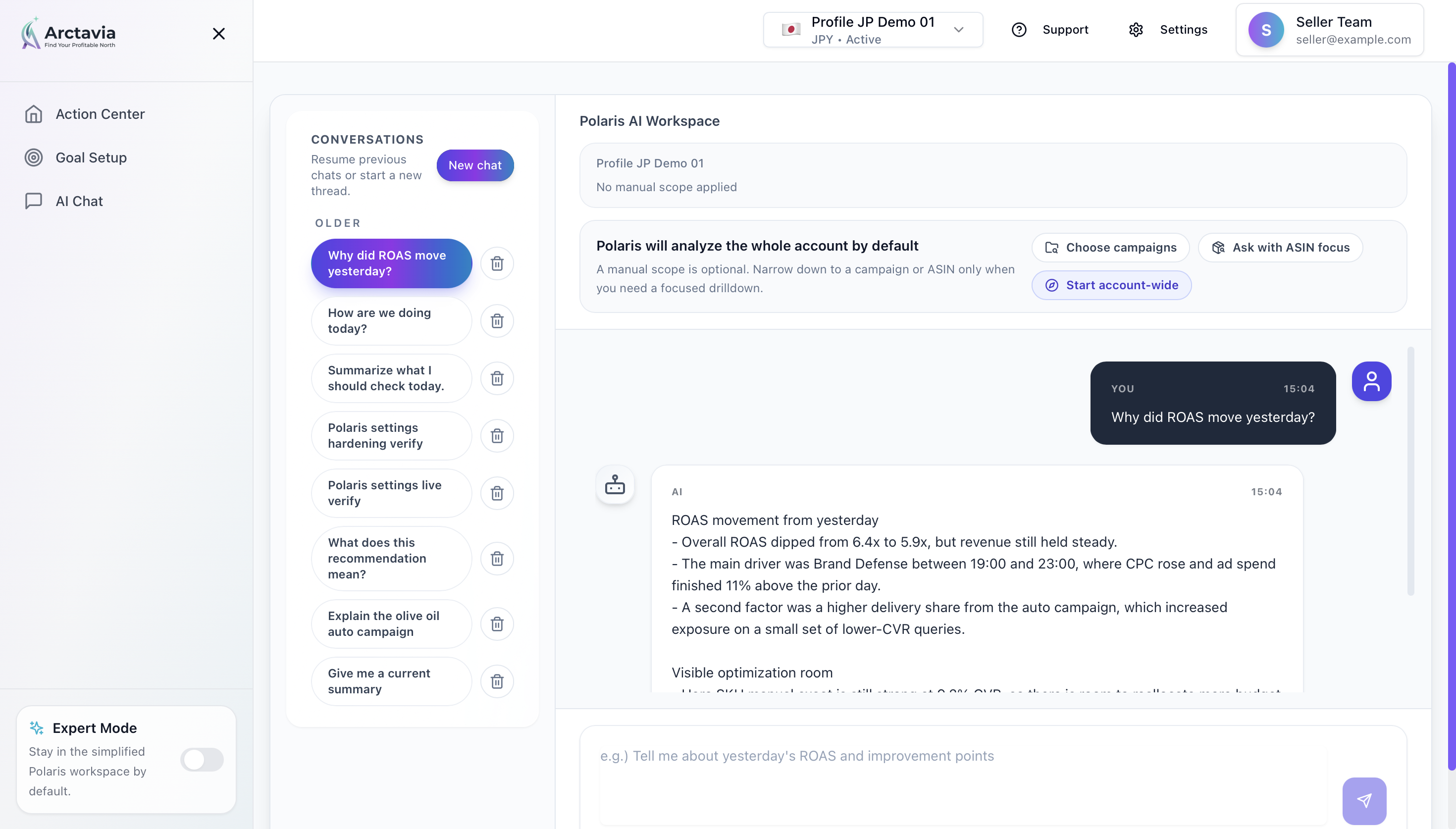
Questions, requests, and approvals happen in one place
Logs and explanations stay close to the action
The workspace is built around exceptions, not endless manual review
What AI Chat Workspace owns
It keeps questions, requests, and approvals in one thread
It keeps logs and explanation close to the decision
It narrows attention to exceptions instead of daily noise
How the workspace is used
1. Narrow attention to what matters today
Journey state and approval summaries should reduce the list before the team even starts reading the thread.
2. Keep explanation and approval in the same operational flow
When reasons and approvals live apart, the workflow gets heavy fast. The workspace tries to keep that thread intact.
3. Leave behind a usable decision trail
Later report reviews and stakeholder discussions need enough continuity between the conversation and the resulting change history.
What sits around it
Approval / plan preview
The backend assembles change summary, impact preview, and risk wording before someone reviews it.
Workspace journey state
This determines whether AI Chat is the main action or only a helper at a given moment.
Reports / review history
Conversation context should stay connected to later consequence review.
What AI assists vs what the person still owns
Prepared
- Composing reasoning summaries and approval context
- Collecting related actions, plans, and logs
- Deep-linking from next-action pages
Human review
- Final goal or strategy changes
- Approval / rejection decisions
- Exception review and instruction
Deeper explanation
Detail 1
1. The workspace narrows attention to what matters today
A team should not read every log line every day. The workspace is meant to bring forward only what truly needs review so the team can move faster without losing visibility.
Detail 2
2. Explanation and approval are not split apart
When the reason lives in one screen and the approval in another, the workflow gets heavy. The design here tries to keep the operational thread intact from explanation through action.
Detail 3
3. Teams can revisit the decision trail later
Explainability matters most when you are reviewing the account later with another stakeholder. The workspace keeps enough continuity between the conversation and the resulting change log.
What you can inspect here
What needs attention today
Why a proposal was made and how it was approved
How the chat context connects to the change history
The product stance here
It is a helper, not the primary journey
Recommended setup and Action Center still lead; chat reduces the cost of exceptions and explanation.
It keeps reasoning close to action
Explainability is stronger when the decision can be made near the evidence, not on another disconnected page.
Try it first
Get found. Get chosen. Keep winning.
The entry point is the free AI search audit. From there, improve your product page and hand over ads operation in one flow. Ads start small: one campaign, 30 days free.
Start with Google
No credit card. The trial starts when you connect Amazon Ads.